|
Fritz The Cat
|
 |
« on: January 21, 2012, 02:21:35 PM » |
|
I have one very important, overriding requirement that no MP3 player seems to satisfy, an easily accessible, easy to operate volume control. I can live without the other controls but find riding with tunes far from satisfactory without volume control. All songs are not recorded at the same level. Some are so loud they hurt your ears, some are so low you can barely hear them. My Goldwing had a big volume knob right in front of me and I took it for granted. Never realized how important it was till I sold it and bought the Valk.  |
|
|
|
|
 Logged
|
|
|
|
Hoser
Member

Posts: 5844
child of the sixties VRCC 17899
Auburn, Kansas
|
|
« Reply #1 on: January 21, 2012, 02:28:58 PM » |
|
If you have an IS, it will play through the radio by plugging it into the aux lead under the right sidecover, if not your SOL, Hoser
|
|
|
|
|
Logged
|
I don't want a pickle, just wanna ride my motor sickle  [img width=300 height=233]http://i617.photobucket.com/albums/ |
|
|
bogator
Member
Posts: 663
IN GOD WE TRUST------KK4KSN-------
Valley,Al
|
|
« Reply #2 on: January 21, 2012, 02:41:13 PM » |
|
OK, here is my set up-----J&M cb --on handlebar-- SANSA CLIP+ --that I downloaded 654 songs from cd's that I have---the J&M has a volume control on it --so the SANSA CLIP+ volume is all the way up--works great for me--hope this helps--I have 2 SANSA CLIP + and diff stuff on them--one with 50's & 60's rock & roll -and the other --I am gonna put the KJV BIBLE on, ordered them from AMAZON. great price too--------------hope this helps----------  -----if you don't have a J&M you can get one from --OVERBY'S two wheel sounds.com---  |
|
|
|
« Last Edit: January 21, 2012, 02:46:03 PM by bogator »
|
Logged
|
|
|
|
|
..
|
|
« Reply #3 on: January 21, 2012, 03:33:03 PM » |
|
|
|
|
|
|
Logged
|
|
|
|
|
BradValk48237
|
|
« Reply #4 on: January 21, 2012, 03:35:57 PM » |
|
I use my iPhone..... most smart phones have a headphone jack fro output...... room for plenty of music and as a bonus you can get phone calls... I have an I/S and it comes out the speakers..... works at ow speed....
Brad
|
|
|
|
|
Logged
|
|
|
|
|
PhredValk
|
|
« Reply #5 on: January 21, 2012, 03:41:30 PM » |
|
I have an Ipod that I use on my IS. When I had the GL1100 I had an amp and handlebar mounted speakers. The Motorcycletunes.com kit came with a simple wheel type volume control that I fixed on the left bar with cable ties. You can buy this type of volume control at any electronics shop for under $20. and connect whatever player you want.
Fred.
|
|
|
|
|
Logged
|
Growing old is mandatory, growing up is optional.
VRCCDS0237
|
|
|
|
Sodbuster
|
|
« Reply #6 on: January 21, 2012, 05:12:18 PM » |
|
|
|
|
|
|
Logged
|
VRCC # 30938 '99 Std. - Black & Silver - "Spirit Horse" Dear God, Seriously .... Thanks for creating beer. You rock !!  |
|
|
|
..
|
|
« Reply #7 on: January 21, 2012, 05:20:15 PM » |
|
Well done. In line volume control with clip. That's what i use but couldn't remember who made it when I posted from my Droid. |
|
|
|
|
Logged
|
|
|
|
|
Fritz The Cat
|
|
« Reply #8 on: January 21, 2012, 06:06:06 PM » |
|
Ahh yes, looks like the inline volume control is what I'm looking for. I can use my iPhone with it.  |
|
|
|
|
Logged
|
|
|
|
|
Jess Tolbirt
|
|
« Reply #9 on: January 21, 2012, 06:08:55 PM » |
|
there is a program you can grab off the net for free that will "normalize" all of your mp3 files. in other words wll make then all the same volume.. i forget the name but when i find it i will post it,, there are slew of them,, take your pick,,, https://www.google.com/search?q=normalize+mp-3+files&ie=utf-8&oe=utf-8&aq=t&rls=Palemoon:en-US:unofficial&client=firefox-a |
|
|
|
« Last Edit: January 21, 2012, 06:10:42 PM by Jess Tolbirt »
|
Logged
|
Valkyrie member # 23084
Started out on old forum on day one but lost my member number.
|
|
|
PAVALKER
Member
Posts: 4435
Retired Navy 22YOS, 2014 Valkyrie , VRCC# 27213
Pittsburgh, Pa
|
|
« Reply #10 on: January 21, 2012, 06:19:28 PM » |
|
My GPS is mounted with a Ram Mount and has it's own MP3 player. Used ear buds with an in line controls on my VTX with the GPS and my Aux input on my Interstate.
|
|
|
|
|
Logged
|
John  |
|
|
|
BF
|
|
« Reply #11 on: January 21, 2012, 09:54:17 PM » |
|
Fritz......
I have several Sony Walkman mp3 players. They all have an equalizing feature that balances the songs so one isn't extreamly loud and the next too quite. It'll balance all the tracks to where they're all at the same level of volume.
|
|
|
|
|
Logged
|
I can't help about the shape I'm in I can't sing, I ain't pretty and my legs are thin But don't ask me what I think of you I might not give the answer that you want me to  |
|
|
|
Serk
|
|
« Reply #12 on: January 21, 2012, 10:48:41 PM » |
|
As was mentioned, an MP3 normalizer will do wonders. I use MP3Gain. It's free, it works, and it doesn't reencode the MP3, so there's no loss of quality as you'd get with programs that de-encode the file, make the change, then re-encode it (MP3 is a lossy format). http://mp3gain.sourceforge.net/As far as the player, I use the MP3 player built into my Zumo 650 MP3 player, and listen to it via Bluetooth speakers in my helmet. It was kinda spendy to get it all set up, but now that it's in place I love it. |
|
|
|
|
Logged
|
Never ask a geek 'Why?',just nod your head and slowly back away...  IBA# 22107 VRCC# 7976 VRCCDS# 226 1998 Valkyrie Standard 2008 Gold Wing Taxation is theft. μολὼν λαβέ |
|
|
rmrc51
Member
Posts: 1087
Freyja. Queen of the Valkyries
Palmyra, Virginia
|
|
« Reply #13 on: January 22, 2012, 02:18:13 AM » |
|
That's the same outfit I'm going with! |
|
|
|
|
Logged
|
VRCC # 30041
|
|
|
|
Slick
|
|
« Reply #14 on: January 22, 2012, 05:03:18 AM » |
|
I've got a question, being new to this new age electronic stuff and all. For those using iphones- is it possible to download music without paying thru the nose for it- where & how-
Sorry to get a little off topic-
Thanks,
Slick
|
|
|
|
|
Logged
|
1999 Valkyrie Interstate,
2003 1800 VTX
|
|
|
|
Jess Tolbirt
|
|
« Reply #15 on: January 22, 2012, 05:59:45 AM » |
|
go to youtube and search for the song you want and then copy the url address
then go to youtube-mp3.org and paste the url in the box and it will convert that song to am mp3 file for downloading..
|
|
|
|
|
Logged
|
Valkyrie member # 23084
Started out on old forum on day one but lost my member number.
|
|
|
|
Fritz The Cat
|
|
« Reply #16 on: January 22, 2012, 06:41:57 AM » |
|
I've got a question, being new to this new age electronic stuff and all. For those using iphones- is it possible to download music without paying thru the nose for it- where & how-
Sorry to get a little off topic-
Thanks,
Slick
6 Yep. Gotta use iTunes but you can put any MP3 on it irregardless of the source. |
|
|
|
|
Logged
|
|
|
|
|
Fritz The Cat
|
|
« Reply #17 on: January 22, 2012, 06:50:21 AM » |
|
go to youtube and search for the song you want and then copy the url address
then go to youtube-mp3.org and paste the url in the box and it will convert that song to am mp3 file for downloading..
Whoa, awesome link, thanks. Just converted "Open Road Music" and "The Goldwing Song". |
|
|
|
|
Logged
|
|
|
|
|
Sodbuster
|
|
« Reply #18 on: January 22, 2012, 07:14:27 AM » |
|
go to youtube and search for the song you want and then copy the url address
then go to youtube-mp3.org and paste the url in the box and it will convert that song to am mp3 file for downloading..
Whoa, awesome link, thanks. Just converted "Open Road Music" and "The Goldwing Song". +1 Thanks Jess .... that's frickin awesome !!!! |
|
|
|
|
Logged
|
VRCC # 30938 '99 Std. - Black & Silver - "Spirit Horse" Dear God, Seriously .... Thanks for creating beer. You rock !! |
|
|
|
BradValk48237
|
|
« Reply #19 on: January 22, 2012, 07:41:40 AM » |
|
Also, with iTunes you can always download any CD you have.... I put a majority of mine into my library and deleted songs from albums that i would never listen to.... right now I have over 45 days of music in my library...... i just set my iPhone on "shuffle' most of the time on the road and have a huge selection.. i do have some road music playlists for certain times..... I do find that when the riding gets "technical" i tend to turn off the music to concentrate on the twisties and staying out of the ditch!
Brad
|
|
|
|
|
Logged
|
|
|
|
Ramjet
Member
Posts: 195
Have Valk, Will Travel!
Buford, GA
|
|
« Reply #20 on: January 22, 2012, 08:33:47 AM » |
|
|
|
|
|
|
Logged
|
Ride more; talk less  |
|
|
MarkT
Member
Posts: 5197
VRCC #437 "Form follows Function"
Colorado Front Range - elevation 2.005 km

|
|
« Reply #21 on: January 22, 2012, 08:40:34 AM » |
|
I needed the same thing - a dial type volume control that would work with any sound device. The volume control on an Ipod is pretty much useless on a bike. Other devices aren't much better. Don't want to be wading through menus, or looking away from the road to operate the volume. This device is perfect, plus it is a pre-amp and a mixer. From my Tech Tips page at http://www.horseapple.com/Valkyrie/Tech_Tips/Jammin_with_Blaupunkt/jammin_with_blaupunkt.html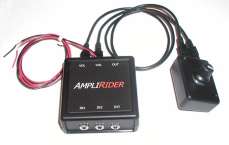 Searching for various pre-amps that would fit my need, I found I think the perfect pre-amp for this application - and many others in fact, so I bought another for my wing. The AmpliRider, found for $65 incl shipping 7/09, at http://www.electric-avenues.com/amplirider.html This unit serves the same function as the Kennedy Cell Set which I had already bought for my wing, and never bothered to install yet. For MUCH more $$$$. Kennedy wants you to buy seperate adapters for every connection at prices I just won't pay - I was going to hard wire everything, but now, I can just plug in all the mini-stereo plugs! It's a small amplifier, with all mini-stereo connectors except the power and ground which you hard-wire. It has 3 inputs that it will mix and output to the single output (you can use for say radar, GPS audio, and music), and a remote volume control you can put anywhere. Very well made, solid, looks like ABS plastic enclosures - compact and available with different wire lengths. I asked Gary for some extra short volume wires on the 2nd one I bought - now I'll use the longer wires for the wing and sell the never-installed Kennedy. The Wing install, had previously required a ground loop isolator to eliminate a buzz for the input from first a RioVolt SP250 player, followed by an Archos Recorder, and now the Ipod Classic. The input for the radar - and I suspect the GPS (though I didn't connect it - don't need a woman's voice nagging me where to turn), required an isolator transformer - radio Shack P/N 273-1374, $3.99, and a couple mono solder plugs and audio wire. (Gary just said, he will mention on the AmpliRider's website that isolation cables may be needed for some detectors, and that they are available prewired.) I also needed a mono wire with male mini plugs both ends, and a mono-stereo female-male (respectively) adapter plug to adapt the mono signal from the radar to stereo to import into the AmpliRider. Used here, the tunes have more than double the volume from before, and the sound is cleaner, and I have a volume knob instead of that useless slide-your-finger volume control on the Ipod. The radar signal is plenty loud, cannot be missed. Here's the AmpliRider and my volume control/Ipod/ voltage meter/power indicator install on my apron. 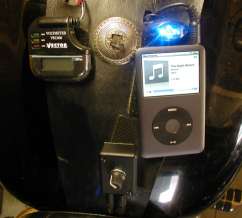 |
|
|
|
|
Logged
|
|
|
|
fudgie
Member
Posts: 10660
Better to be judged by 12, then carried by 6.
Huntington Indiana
|
|
« Reply #22 on: January 22, 2012, 08:49:20 AM » |
|
I bought a cheap MP3 from K-Mart. $20. Works great. I wanted one that uses AAA batt instead of a charger. Hard to charge when your on a trip. With the right batt mine will last 30 hours or more. I just put it in the tank bib. I do have vol controls like the one posted above. I got mine on clearance from another web site for $9. MC tunes wanted $72. Same one. Seems like using your phone would drain the battery fast. Then again I dont have a fancy phone. Sometimes I have trouble charging a phone on a trip.
This spring I'm getting a a mc radio set up that a member here posted months ago.
|
|
|
|
|
Logged
|
 Now you're in the world of the wolves... And we welcome all you sheep... VRCC-#7196 VRCCDS-#0175 DTR PGR |
|
|
|
BradValk48237
|
|
« Reply #23 on: January 22, 2012, 08:57:44 AM » |
|
I have a 12 v powerpoint from O'Rielly auto connected to the electrical...like $7 or less... Its in the pouch on my tank bib... cell phone charger plugs right in.... Viola'! phone and MP3 charged all day... for just a little time... Also modified a $5 plastic belt clip holster and a old handlebar mount bracket to hold the phone on the handlebars..... so low dough fix.
Even some of the non "Fancy" phones will store music.......
Brad
|
|
|
|
|
Logged
|
|
|
|
|
GotValk
|
|
« Reply #24 on: January 22, 2012, 11:54:13 AM » |
|
Use to use my I-pod, Now I'm doing the GPS like PAValker mentioned. .jpg) The pouch next to the tach is for the I-pod. Good Luck! |
|
|
|
|
Logged
|
|
|
|
judd
Member
Posts: 265
VRCC# 13453
B.C. Canada
|
|
« Reply #25 on: January 22, 2012, 07:10:10 PM » |
|
=1 ............... What MarkT says, I run the same preamp/volume control with my Rumble Roads http://www.electric-avenues.com/amplirider.html Great little unit. |
|
|
|
|
Logged
|
|
|
|
|
Garry 2r's
|
|
« Reply #26 on: January 23, 2012, 05:40:54 AM » |
|
I have found the skyfi3 makes a great mp3 player with larger buttons and screen you can use a 2gb mini sd card and have about 250 songs per card. I hard wired 12 volt power for it or it has a internal battery. I added a volume control from radio shack (7 dollars) with tie wraps to my hand grip very easy to control volume.   You can get the player's from e-bay around 40 dollars. |
|
|
|
|
Logged
|
|
|
|
|
Chattanooga Mark
|
|
« Reply #27 on: January 23, 2012, 09:32:01 AM » |
|
GotValk,
Can you please shed some light on your GPS mount. Your setup looks about perfect.
Thank You,
Mark
|
|
|
|
|
Logged
|
...do justice, love kindness, walk humbly... The Bible: Read, Apply, Repeat 2012 Victory Cross Country Tour, in all its pearl white beauty www.bikersforchrist.org |
|
|
|